我的情况跟博主差不多去年开始做博客,我很庆幸刚刚开始还有大佬带着教我一下常用的知识但是因为种种原因大佬比较忙现在自己慢慢研究,记得刚刚开始看代码的时候一头雾水


但是静下心来慢慢看还是可以看到,我常常在思考为什么要写博客有什么作用意义在哪?
看到这篇文章我知道了找到了自己,第一是为了提升自己的能力第二就是为了更好的学习吧
生命不息,奋斗不止
做人如果没有理想,跟咸鱼有什么区别出自《少林足球》-- 周星驰
是啊刚刚开始只是想着做一个网站写一些好的文章现在实现了想想道路还是很艰难的
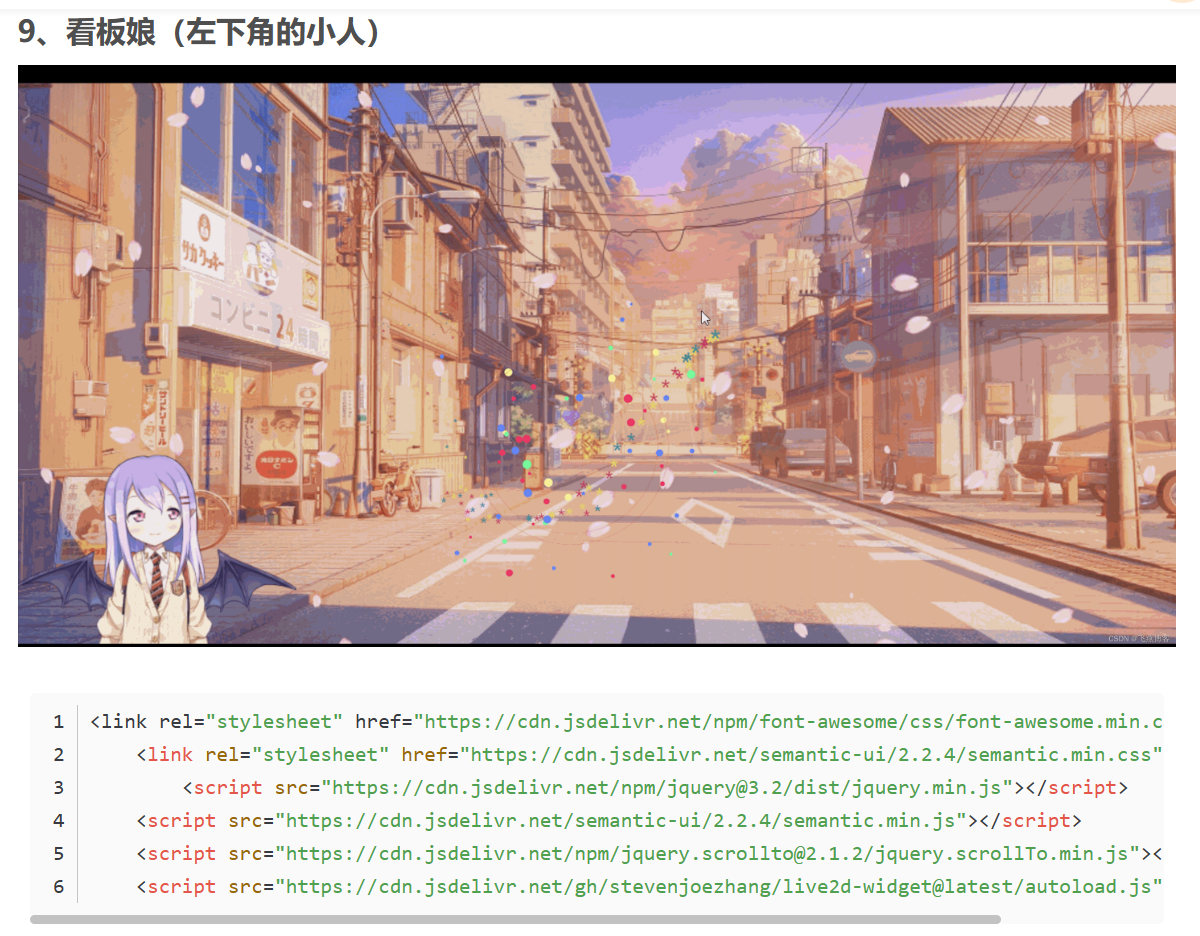
就一个花瓣效果我就改了两天当成功的时候还是很开心的因为我做到了
我认为应该勇于挑战自己的极限来提升自己的实力
别去羡慕别人有什么那还不如自己努力来的实在
因为你只看到他成功了没有看到背后努力的过程
人们通常只看结果不看过程成为了普遍现象
相信在未来的自己再看到这篇文章时一定会感慨当时做的决定
总有人要赢,为什么不能是我!
加油相信自己一定可以!


他是直接添加在PHP里面但是有时候可能加载不出来要耐心等待一下因为我弄这个搞了两天才出来的有时候不太稳定
https://www.cnblogs.com/pumpkinhlk/p/15410970.html
https://www.cnblogs.com/eve-d/p/15683541.html
第二个是在typecho里的直接修改外观改自定义CSS样式和自定义body标签末尾位置内容,自定义Footer内容可加可不加
CSS代码:
*{
transition: all 0.4s;
}
margin: 0 auto;
width: 80%;/原始65/
min-width: 980px;/页面顶部的宽度/
">rgba(245, 245, 245, 0.7);
padding: 30px;
margin-top: 50px;
margin-bottom: 50px;
box-shadow: 0 2px 6px rgba(100, 100, 100, 0.3);
}
body {
background-image: url("http://ww4.sinaimg.cn/large/637d0877gw1exlma5gj0wj21hc0u04p6.jpg");
background: rgba(12, 100, 129, 1) url('http://images.cnblogs.com/cnblogs_com/Penn000/1013849/o_123.jpg') fixed no-repeat;
background-position: 50% 5%;
background-size: cover;
}
cursor: pointer;
transition: all 0.2s;
}
transform: scale(1.5) rotate(360deg);
color:#FF0;
opacity:0.5;
}
height: 100px; /高度/
clear: both;
">rgba(245, 245, 245, 0);
}
font-size: 36px;
font-weight: bold;
line-height: 1.8em;/原始 1.6em/
margin-top: 10px;/原始 15px /
color: #548B54;
}
font-weight: normal;
font-size: 17px;/原始 16px ;font-size: 1.0rem;/
line-height: 1.8;
color: #111;
font-weight: bold;
text-align: right;
float: right;
}
">rgba(33, 160, 139, 0.9);
}
color: #eee;
font-size: 18px;
font-weight: bold;
}
.blogStats{
color: #eee;
}
.postTitle {
border-left: 8px solid rgba(33, 160, 139, 0.68);
margin-left: 10px;
margin-bottom: 10px;
font-size: 20px;
float: right;
width: 100%;
clear: both;
}
.postTitle a:link, .postTitle a:visited, .postTitle a:active {
color: #21759b;
transition: all 0.4s linear 0s;
}
.postTitle a:hover {
margin-left: 30px;
color: #0f3647;
text-decoration: none;
}
.postCon {
float: right;
line-height: 1.5em;
width: 100%;
clear: both;
padding: 10px 0;
}
.day .postTitle a {
padding-left: 10px;
}
.day {
background: rgba(255, 255, 255, 0.5);
}
/文章附加信息/
.postDesc {
background: url(images/posted_time.png) no-repeat 0 1px;
color: #757575;
float: left;
width: 100%;
clear: both;
text-align: left;
font-family: "微软雅黑" , "宋体" , "黑体" ,Arial;
font-size: 13px;
padding-right: 20px;/5px padding-left: 90px;posted 发表时间左边距离/
margin-top: 20px;
line-height: 1.8;
padding-bottom: 35px;
}
.newsItem, .catListEssay, .catListLink, .catListNoteBook, .catListTag, .catListPostCategory,
.catListPostArchive, .catListImageCategory, .catListArticleArchive, .catListView,
.catListFeedback, .mySearch, .catListComment, .catListBlogRank, .catList, .catListArticleCategory ,#blog-calendar
{
background: rgba(255, 255, 255, 0.5);
margin-bottom: 35px;
word-wrap: break-word;
}
.CalTitle{
background: rgba(255, 255, 255, 0);
}
.catListTitle{
">rgba(33, 160, 139, 0.9);
}
background: rgba(255, 255, 255, 0.5);
}
.c_ad_block{
display: none;
}
width: 100%;
height: 200px;
background: rgba(255, 255, 255, 0.5);
}
.CalNextPrev{background: rgba(255, 255, 255, 0);}
但是我觉得太长了因为太长了看起来很麻烦
canvas#live2dcanvas {
border: 0 !important;
left: 0;
}
这个相对了说比较适合
最重要的还是自定义body标签末尾位置内容
看板娘的图形代码地址合集:https://www.lanol.cn/post/305.html
还可以自己弄一张图片上去还有聊天内容也可以修改可以看看上面的链接
以上都是借鉴大佬们的如有侵权请及时告诉我,我立即修改!
其他版本:https://paugram.com/coding/add-poster-girl-with-plugin.html
<meta charset="UTF-8" />
<meta name="Keywords" content="" />
<meta name="Description" content="" />
<title>图册</title>
<!-- 如果我有天醒来 -->
<!-- 层叠样式表 -->
<style type="text/css">
/* 去掉默认效果 */
* {
margin: 0;
padding: 0;
}
body {
background: #222;
overflow: hidden;
/* 取消选中 */
user-select: none;
}
@keyframes rotate {
100% {
transform: rotateY(360deg);
}
}
.perspective {
/*子元素透视 场景深度*/
perspective: 600px;
}
.wrap {
/* 3d */
width: 135px;
height: 240px;
margin: 100px auto;
position: relative;
/* border: 1px solid red; */
transform: rotateX(-20deg) rotateY(0deg);
transform-style: preserve-3d;
}
.wrap img {
display: block;
/* 绝对定位 */
position: absolute;
width: 100%;
height: 100%;
transform: rotateY(0deg) translateZ(0px);
background: transparent;
box-shadow: 0 0 4px #fff;
border-radius: 5px;
/* webkit */
}
/* 照片底座 */
.wrap p {
width: 1200px;
height: 1200px;
background: -webkit-radial-gradient(center center, 600px 600px, rgba(122, 122, 122, 0.5), rgba(0, 0, 0, 0));
position: absolute;
border-radius: 50%;
left: 50%;
top: 100%;
margin-left: -600px;
margin-top: -600px;
/* 沿着x轴按倒 */
transform: rotateX(90deg);
}
</style><!-- 盒子容器 -->
<div class="perspective">
<div class="wrap" id="imgwrap">
<!-- 引入图片值页面 -->
//图片自选
<img class="f1" src="01.jpg" />
<img class="f1" src="02.jpg" />
<img class="f1" src="03.jpg" />
<img class="f1" src="1.webp" />
<img class="f1" src="2.webp" />
<img class="f1" src="3.webp" />
<img class="f1" src="4.webp" />
<img class="f1" src="5.webp" />
<img class="f1" src="6.webp" />
<img class="f1" src="7.webp" />
<img class="f1" src="8.webp" />
<img class="f1" src="9.webp" />
<img class="f1" src="10.webp" />
<img class="f1" src="11.webp" />
<img class="f1" src="12.webp" />
<img class="f1" src="13.webp" />
<img class="f1" src="14.webp" />
<img class="f1" src="15.webp" />
<img class="f1" src="16.webp" />
<img class="f1" src="17.webp" />
<img class="f1" src="18.webp" />
<img class="f1" src="19.webp" />
<img class="f1" src="20.webp" />
<img class="f1" src="21.webp" />
<img class="f1" src="22.webp" />
<img class="f1" src="23.webp" />
<img class="f1" src="24.webp" />
<img class="f1" src="25.webp" />
<img class="f1" src="26.webp" />
<img class="f1" src="27.png" />
<img class="f1" src="27.webp" />
<img class="f1" src="01.jpg" />
<img class="f1" src="02.jpg" />
<!-- 引入图片值页面 -->
<img class="f2" src="01.jpg" />
<img class="f2" src="02.jpg" />
<img class="f2" src="03.jpg" />
<img class="f2" src="4.webp" />
<img class="f2" src="5.webp" />
<img class="f2" src="6.webp" />
<img class="f2" src="7.webp" />
<img class="f2" src="8.webp" />
<img class="f2" src="9.webp" />
<img class="f2" src="10.webp" />
<img class="f2" src="11.webp" />
<img class="f2" src="12.webp" />
<img class="f2" src="13.webp" />
<img class="f2" src="14.webp" />
<img class="f2" src="15.webp" />
<img class="f2" src="16.webp" />
<img class="f2" src="17.webp" />
<img class="f2" src="18.webp" />
<img class="f2" src="19.webp" />
<img class="f2" src="20.webp" />
<img class="f2" src="21.webp" />
<img class="f2" src="22.webp" />
<img class="f2" src="23.webp" />
<img class="f2" src="24.webp" />
<img class="f2" src="25.webp" />
<img class="f2" src="26.webp" />
<img class="f2" src="27.png" />
<img class="f2" src="27.webp" />
<img class="f2" src="1.webp" />
<img class="f2" src="2.webp" />
<img class="f2" src="3.webp" />
<img class="f2" src="01.jpg" />
<img class="f2" src="02.jpg" />
<!-- 引入图片值页面 -->
<img class="f3" src="01.jpg" />
<img class="f3" src="02.jpg" />
<img class="f3" src="03.jpg" />
<img class="f3" src="4.webp" />
<img class="f3" src="5.webp" />
<img class="f3" src="6.webp" />
<img class="f3" src="7.webp" />
<img class="f3" src="8.webp" />
<img class="f3" src="9.webp" />
<img class="f3" src="10.webp" />
<img class="f3" src="11.webp" />
<img class="f3" src="12.webp" />
<img class="f3" src="13.webp" />
<img class="f3" src="14.webp" />
<img class="f3" src="15.webp" />
<img class="f3" src="16.webp" />
<img class="f3" src="17.webp" />
<img class="f3" src="18.webp" />
<img class="f3" src="20.webp" />
<img class="f3" src="19.webp" />
<img class="f3" src="21.webp" />
<img class="f3" src="22.webp" />
<img class="f3" src="23.webp" />
<img class="f3" src="24.webp" />
<img class="f3" src="25.webp" />
<img class="f3" src="26.webp" />
<img class="f3" src="27.png" />
<img class="f3" src="01.jpg" />
<img class="f3" src="02.jpg" />
<img class="f3" src="010.webp" />
<img class="f3" src="5.webp" />
<img class="f3" src="6.webp" />
<img class="f3" src="7.webp" />
<p></p>
</div>
</div>
<!-- src="JS/photo.js" -->
<script type="text/javascript">
var oImg = document.getElementsByClassName("f1");
var oImg2 = document.getElementsByClassName("f2");
var oImg3 = document.getElementsByClassName("f3");
var len = oImg.length;
console.log(len);
var deg = 360 / len;
var oWrap = document.getElementById("imgwrap");
// var oWrap=document.querySelector('.wrap');
//页面加载完毕在执行的代码
window.onload = function () {
Array.prototype.forEach.call(oImg, function (ele, index, self) {
// 旋转并沿Z轴平移
ele.style.transform = "rotateY(" + deg * index + "deg) translateZ(645.75px)";
//过渡时间1s
ele.style.transition = "1s " + (len - index) * 0.1 + "s";
});
Array.prototype.forEach.call(oImg2, function (ele, index, self) {
// 旋转并沿Z轴平移
ele.style.transform = "rotateY(" + deg * index + "deg) translateZ(645.75px) translateY(240px)";
//过渡时间1s
ele.style.transition = "1s " + (len - index) * 0.1 + "s";
});
Array.prototype.forEach.call(oImg3, function (ele, index, self) {
// 旋转并沿Z轴平移
ele.style.transform = "rotateY(" + deg * index + "deg) translateZ(645.75px) translateY(480px)";
//过渡时间1s
ele.style.transition = "1s " + (len - index) * 0.1 + "s";
});
// Array.prototype.forEach.call(oImg, function (ele, index, self) {
// // 旋转并沿Z轴平移
// ele.style.transform = "rotateY(" + deg * index + "deg) translateZ(350px)";
// //过渡时间1s
// ele.style.transition = "1s " + (len - index) * 0.1 + "s";
// });
};
//翻动3D相册
var newX,
newY,
lastX,
lastY,
minusX,
minusY,
rotX = -20,
rotY = 0;
document.onmousedown = function (e) {
// 点击设置初值
lastX = e.clientX;
lastY = e.clientY;
this.onmousemove = function (e) {
newX = e.clientX;
newY = e.clientY;
minusX = newX - lastX;
minusY = newY - lastY;
rotX -= minusY * 0.2;
rotY += minusX * 0.1;
oWrap.style.transform = "rotateX(" + rotX + "deg) rotateY(" + rotY + "deg)";
lastX = newX;
lastY = newY;
};
this.onmouseup = function (e) {
//鼠标松开
this.onmousemove = null; //清除鼠标移动
};
};
</script>


2.橡皮擦的作用:像皮擦工具就是把你不要的那块给擦除,你自己可以试下,用它擦图的时候,擦过的地区会是透明的,如果下面还有一层图的话,会透出下层图
复位工作区
如果面板被拖拽的很乱,想恢复原来位置,可以点击:窗口–工作区–复位基本功能
暂存盘
编辑–首选项(在最下面)–暂存盘(Ctrl+K)
历史记录
为了方便我们操作失误后,找回更多的历史记录,我们可以将 性能–历史记录改多一些